
One pet photo
Pet photo review requests that pet parents actually open
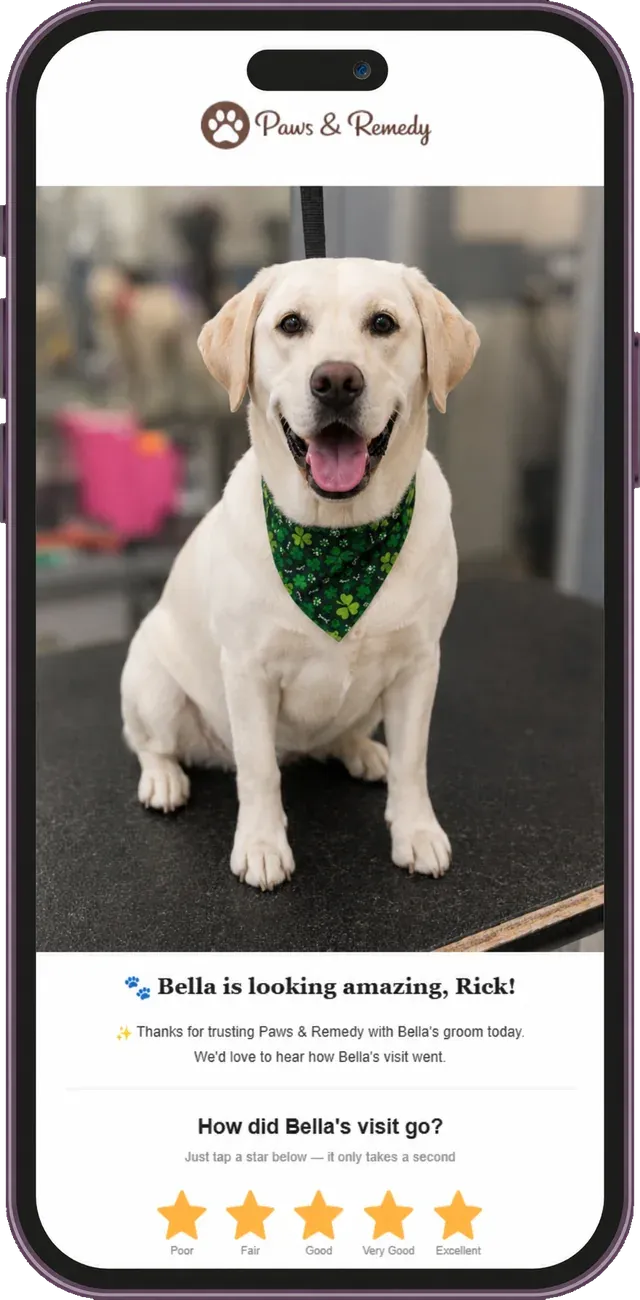
A pet photo review request is a review request with a finished photo of the customer's own pet in it. ReviewCrusher sends it after the visit by text or email, with the customer's name, the pet's name and a personal message, and asks one question: how did the visit go?
It's built for pet-service businesses, where the pet is the reason the customer came. Nobody ignores a photo of their own dog.
Every customer can still leave a public review.
Why generic review links get ignored
Most review requests look the same: "Thanks for your visit! Leave us a Google review." They land between appointment reminders and promotions, and happy customers mean to follow through, then don't.
A request with Bella looking her best after her groom is different. It gets opened, smiled at, and answered.
How a pet photo review request works
Your team snaps a photo of the finished pet, or picks one already taken. ReviewCrusher puts it in the request with the customer's name, the pet's name and an AI-written message you can edit, then sends it by text or email.
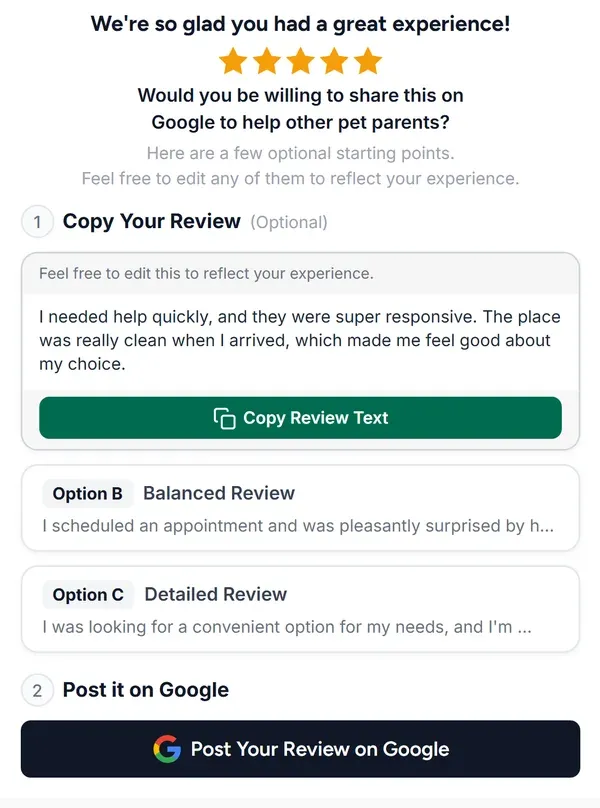
The customer taps a star. Happy customers get editable review ideas and a path to Google. Customers with a concern can tell you privately, and every customer can still leave a public review. Customers who forget get automatic reminders.
- Snap a finished photo and it goes right into the request
- Personal message with the customer's and pet's names
- Sent by text or email, from your own branded email domain
- No photo? Your branded CrushPix image is used automatically
Who uses pet photo requests
Groomers
Send the finished groom while the customer is still admiring it. For transformations, use a before-and-after request.
Boarding and daycare
Send a request when the stay ends, with a photo and a personal note about the pet.
Mobile pet services
Snap a photo at the curb and send before you pull away, with the Snap2Review app.
Sitters, walkers and trainers
Send a personal request from your phone right after each visit, walk or class, while the progress is fresh.
Send it by hand or automatically
From the phone, Snap2Review puts the photo, the contact and the message on one screen. Connected to your software, requests send automatically after a completed appointment, checkout or payment.
See automated review requests, or compare every request type on the features page.
Questions about pet photo review requests
Do I have to take a photo every time?
No. When no pet photo is taken, ReviewCrusher uses your branded CrushPix image automatically, with the customer's and pet's names.
Will customers feel like it's automated?
Requests use the customer's name, the pet's name, visit details, and a photo, or your company image when no photo is taken, so they read as personal.
Can customers still leave a public review?
Yes. Every customer can leave a public review. Customers with a concern are also invited to share private feedback with you, and they always keep access to public review options.
Does AI write reviews for my customers?
No. AI drafts the request message you send, and offers customers three starting points they can edit or replace with their own words. Nothing is posted for anyone. The customer decides what to post.
Will my staff find it hard to use?
Requests send automatically, so your team doesn't have to learn a new system to keep reviews coming. When you want to send one by hand, Snap2Review takes a few seconds.
Send your first pet photo request this week
Try ReviewCrusher free for 14 days, or tap through the live demo to see what your customers get.
14-day free trial, card required. Cancel anytime during the trial. 30-day money-back guarantee, counted from the day your trial activates.