
How it works
How ReviewCrusher works, from finished visit to Google review
ReviewCrusher is review automation built only for pet-service businesses: groomers, boarding and daycare, trainers, pet sitters, walkers, mobile services and veterinary practices. After each visit, it sends the customer a personal request by text or email, with their name, their pet's name and a photo. One tap tells you how the visit went.
Happy customers get editable review ideas and a quick path to Google. Customers with a concern can tell you privately, and every customer can still leave a public review. Follow-ups run on their own, so your team never chases anyone.
Every customer can still leave a public review.
Step 1
Capture the moment the visit ends
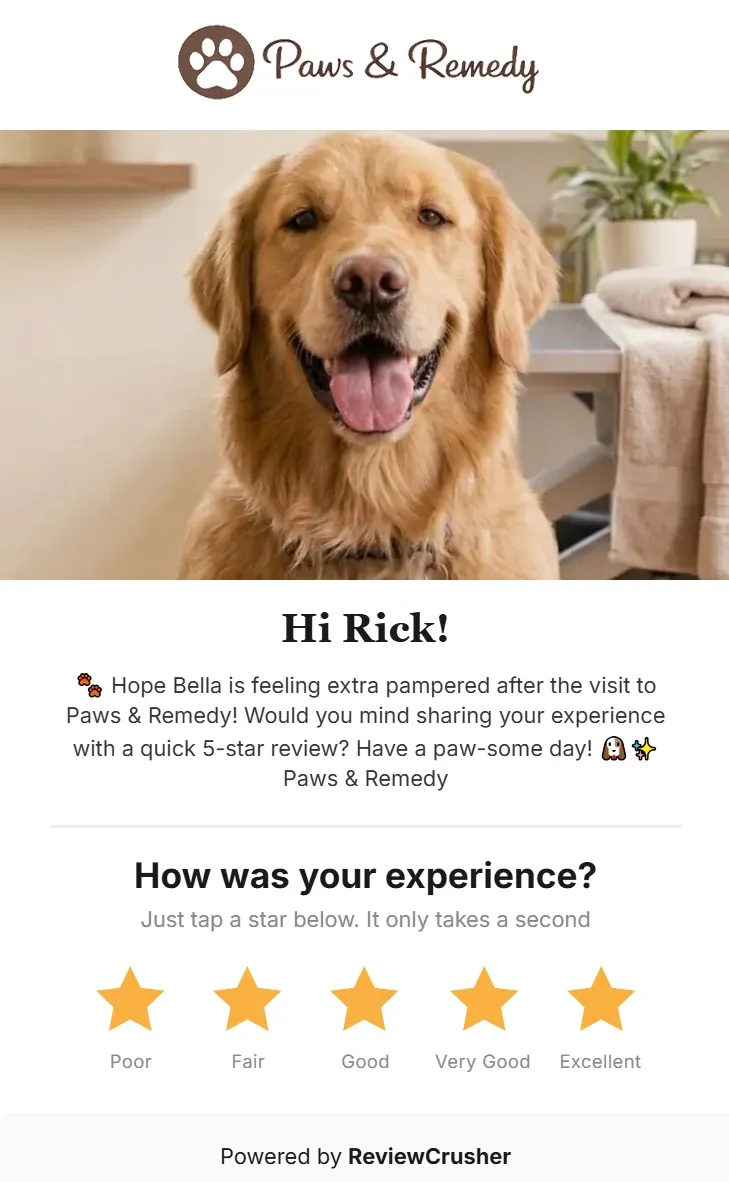
Every request starts with an image of the pet the customer just trusted you with. After a groom, a boarding stay or a training class, your team picks one of three request types, or lets ReviewCrusher choose automatically.
If nobody had time to take a photo, the request still sends with your branded CrushPix image. Requests can go out by hand from a phone, or automatically from the software you already use.
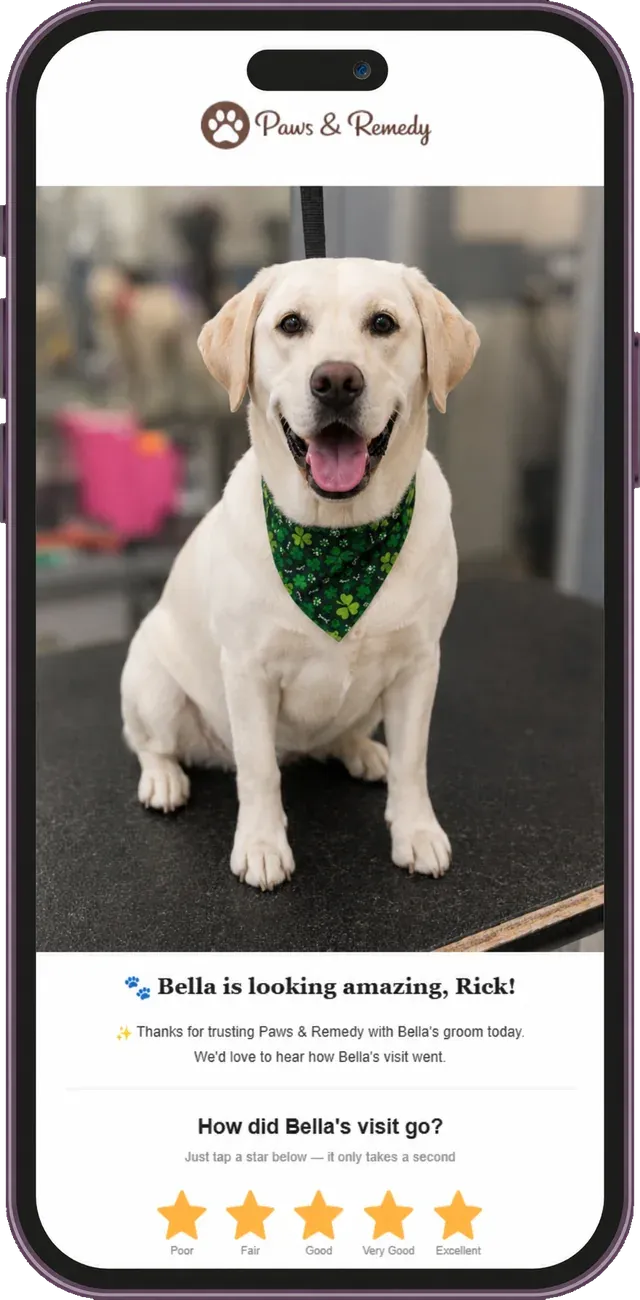
One pet photo
Snap a finished photo and it goes right into the request, next to the customer's and pet's names.
See how pet photo review requests workBefore and after
Show the transformation with before-and-after images. It's the request type built for groomers.
See how before-and-after review requests workCrushPix company image
No photo? Your branded image is used automatically, with the same personal message.
Learn how CrushPix worksStandalone or automated
Send requests manually, or trigger them after completed appointments, checkouts or payments.
See how automated review requests work
Step 2
Personalize every request with AI
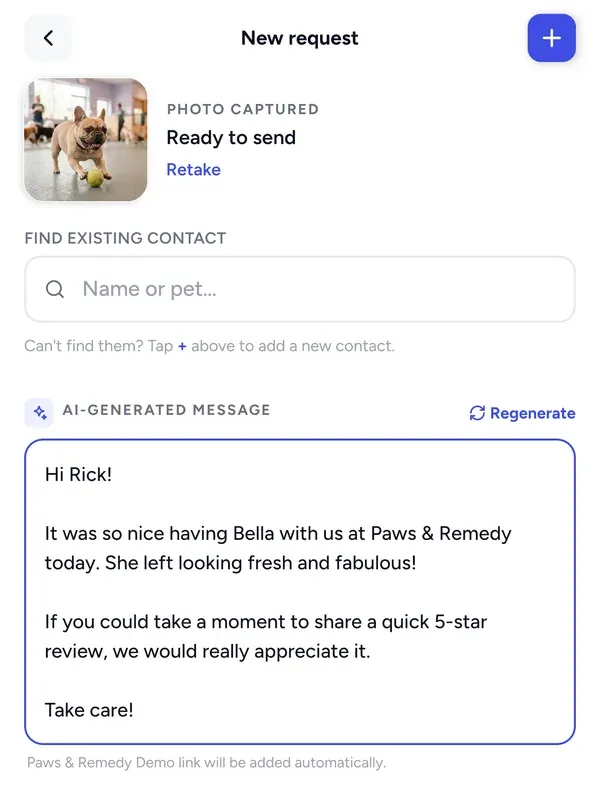
A generic "rate us" link gets lost between appointment reminders. ReviewCrusher's AI drafts a message with the customer's name, the pet's name, the service and your business, so each request reads like a note from your front desk.
You can review and edit the message before it goes out. On the phone, the Snap2Review app puts the photo, the contact and the AI-written message on one screen, so sending takes seconds.
- AI-written messages you can review and edit
- Pet, customer, service and business details filled in
- Editable review suggestions for the customer, later in the flow
Step 3
Send by text or email, then follow up automatically
Requests reach customers by text or email, and emails go out from your own branded email domain. Connected to your scheduling or payment software, ReviewCrusher sends a request when an appointment ends, a customer checks out, or an invoice is paid.
Customers who meant to respond and forgot get automatic reminders, based on rules you set. You never track who got what. If you'd rather not set it up yourself, our team can configure it for you.
Text or email
Reach customers where they are most likely to respond.
Read about text and email requestsAutomated follow-ups
Remind customers automatically when they have not responded.
See how automated follow-ups workSmart timing
Trigger requests after appointments, checkouts or payments.
Read about smart timingDone-for-You Setup
An optional one-time service: we configure branding, messages, follow-ups and integrations.
What Done-for-You Setup includes
Step 4
The customer responds in one tap
Before asking for a review, ReviewCrusher asks about the experience. The next screen fits the customer's answer, and the public review option stays open to everyone.
Tap a star experience
The request asks one question, such as "How was Bella's visit today?", with five stars from Poor to Excellent. One tap, no typing. It takes a second on a phone, so more customers finish it.
Automatic reminders nudge the customers who meant to tap and forgot.
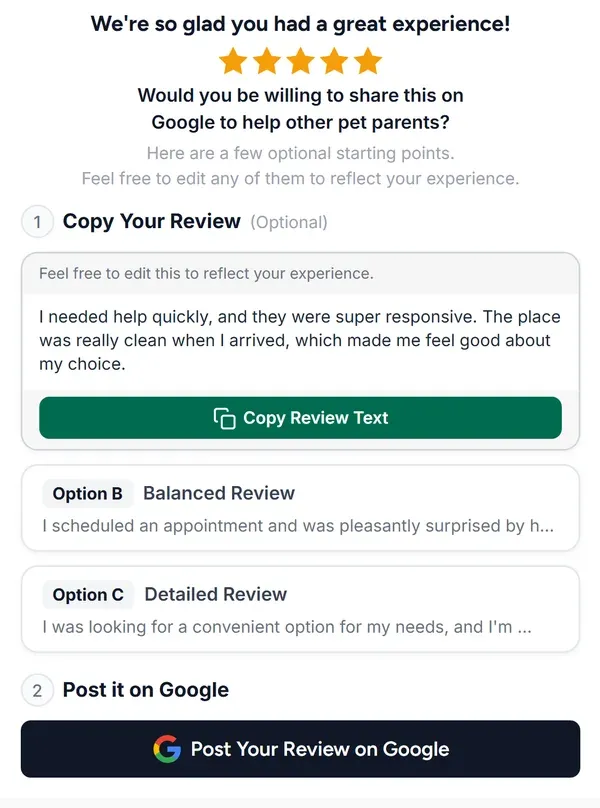
Helpful review options
Customers who had a great visit see three suggested starting points based on their visit. They can copy one, edit it, or write their own, then post it on Google. The words are always theirs.
AI never writes or posts a review for anyone. The customer decides what to post.
Private feedback alerts
Customers with a concern are invited to tell you privately, so you hear about it sooner and can respond. They can still leave a public review.
How private feedback alerts workReview policy monitoring
ReviewCrusher helps you spot Google reviews that may violate Google's policies and walks you through reporting them. Google makes the final decision.
Read about review policy monitoring
Step 5
Grow your reputation
Personal requests, one-tap answers and automatic follow-ups add up to more completed requests and a steady flow of recent reviews. ReviewCrusher also helps with what comes after the review.
More reviews, with less staff effort
Most happy customers mean to leave a review and then don't. A request with their own pet's photo gets opened, a one-tap question gets answered, and reminders reach the ones who forgot.
How many new reviews you get depends on how many customers you serve and how often you send requests. ReviewCrusher doesn't promise a number, a rating or a ranking.
AI review responses
Draft thoughtful, professional replies to the reviews you receive, then review, edit and post them.
See how AI review responses workWebsite and social sharing
Showcase reviews on your website with a review widget, and share them on your social channels.
See website and social sharingReporting dashboard
Track requests, responses, reviews and ratings, and compare locations from one account.
Read about the reporting dashboard
Works with the software you already use, or on its own
ReviewCrusher connects with pet-business software such as MoeGo, Gingr, Pawfinity, PetExec, 123Pet and DaySmartPet; payment and POS tools such as Square, Clover, QuickBooks and Lightspeed; scheduling tools such as Time To Pet, Kennel Connection and Vagaro; and GoHighLevel, webhooks and an API.
No integration? Send requests manually from a phone or tablet, or upload a daily CSV. Don't see your software? Ask us about a custom integration.
See all integrationsQuestions owners ask about how it works
Can customers still leave a public review?
Yes. Every customer can leave a public review. Customers with a concern are also invited to share private feedback with you, and they always keep access to public review options.
Does ReviewCrusher block bad reviews?
No. ReviewCrusher never blocks or filters reviews. When a customer's experience wasn't great, they're encouraged to contact you directly, and they always keep the option to post a public review.
Does AI write reviews for my customers?
No. AI drafts the request message you send, and offers customers three starting points they can edit or replace with their own words. Nothing is posted for anyone. The customer decides what to post.
Do I have to take a photo every time?
No. When no pet photo is taken, ReviewCrusher uses your branded CrushPix image automatically, with the customer's and pet's names.
Will it work with my current software?
ReviewCrusher connects with several pet-service and payment platforms, and it can also run on its own. If your software isn't listed, you can run it standalone, upload a CSV, or ask us about a custom integration.
How long does setup take?
Setup starts with a short onboarding form and a call with a Customer Success Manager. Our team handles the technical setup for you.
See it work with your own customers
Try ReviewCrusher free for 14 days, or tap through the live demo first.
14-day free trial, card required. Cancel anytime during the trial. 30-day money-back guarantee, counted from the day your trial activates.